ZB4-BA3
ActiveHarmony XB4 Green Flush Push Button Head
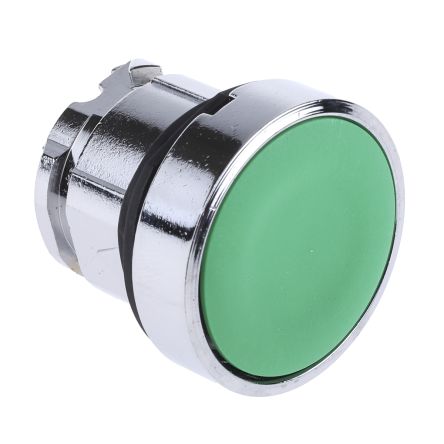
Green flush push button head for Schneider Harmony XB4 series. 22mm cutout, IP66 rated. Requires separate contact block (ZB4-BZ101 for 1NO).
Common Applications
Commonly found as the start button on commercial kitchen equipment including Henny Penny and Frymaster deep fryers, conveyor systems in food processing plants, and packaging machinery. The IP66 front-face rating means it handles daily steam cleaning and hot oil splashes without degrading. The metal bezel resists corrosion in humid environments where plastic alternatives warp or crack. In HVAC applications, this button typically controls fan start or damper open functions on control panels.
Commonly Found On
Counterfeit Warning Medium risk
Counterfeit Schneider Harmony buttons are common in Asian markets. Genuine Schneider has QR code on packaging linking to verification site, crisp CE/UL markings, and consistent chrome bezel finish. Counterfeits often have rough casting, misaligned markings, and poor spring return feel. Buy from authorized Schneider distributors.
Compatibility
Compatible with all Schneider Harmony XB4 contact blocks (ZB4-BZ series, ZBE series). Also fits legacy Telemecanique XB2 mounting holes. Contact blocks are shared between XB4 and XB5 ranges.
Specifications
|
Actuator Shape
The physical shape of the pressable surface.
|
Round
|
|
Actuator Type
The button head style. Flush sits level with the bezel (prevents accidental presses). Extended protrudes for easy access.
|
Flush
|
|
Certifications
Third-party safety certifications. UL = required for US NEC installations. CE = EU compliance. CSA = Canadian standards.
|
UL, CSA, CE
|
|
Color
Button/actuator color. Green = start/go, Red = stop/emergency, Yellow = caution, Blue = reset (per IEC 60204-1).
|
Green
|
|
Contact Configuration
Normally Open — circuit is off until you press. Standard for start/go/enable functions.
|
1NO (with ZB4-BZ101)
|
|
Cutout Diameter
The hole size you drill in your panel to mount this button. 22mm is the most common industrial standard worldwide.
|
22mm
|
|
IP Rating
IP66: Dust-tight and withstands powerful water jets from any direction. Standard for outdoor and washdown applications.
|
IP66
|
|
Material
The bezel/body material. Metal bezels are more durable in harsh environments. Plastic is lighter and cheaper.
|
Metal
|
|
Mechanical Life
How many press cycles before mechanical failure. Higher is better — 10M cycles at 100 presses/day = 274 years.
|
10,000,000 cycles
|
|
Mounting Type
How the button attaches to the panel. Panel mount is standard — installs through a cutout from the front.
|
Panel
|
|
Max Operating Temp
Highest temperature the button is rated to operate in.
|
70°C
|
|
Min Operating Temp
Lowest temperature the button is rated to operate in.
|
-25°C
|
Specs with this icon are linked to the manufacturer's original source page
You'll Also Need
This is a modular component. For a complete assembly, you may also need:
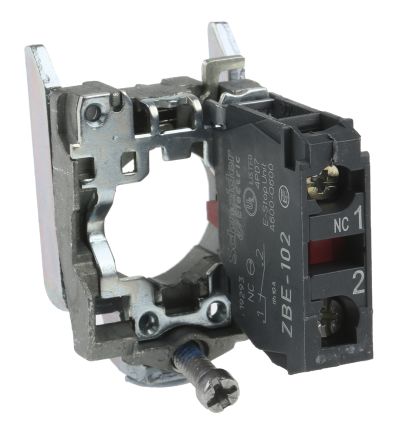
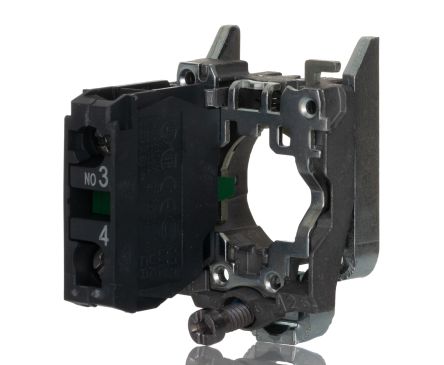
Compatible Alternatives
These products are functionally equivalent cross-references from other manufacturers.
IDEC
HW1B-M110G
HW Green Flush Push Button (1NO)
Omron
A22-FG-10M
A22 Green Flush Push Button (1NO)
Siemens
3SU1130-0AB40-1BA0
SIRIUS ACT Green Flush Push Button (1NO)
Eaton
M22-DP-G-K10
M22 Green Flush Push Button with 1NO Contact Block
ABB
MP3-10G
Modular Extended Green Push Button (1NO)
Siemens
3SU1100-0AB40-1BA0
SIRIUS ACT Green Flush Push Button Plastic (1NO)
Eaton
M22-D-G
M22 Green Flush Push Button
ABB
MP1-10G
Modular Green Flush Push Button (1NO)
Installation Quick Reference
Panel cutout: 22mm. Insert from the front of the panel, secure with mounting nut from behind (tighten to 2-3 Nm).
Contact block: Snap or screw the contact block onto the rear of the button body. Ensure the contact block orientation matches the wiring diagram — NO terminals are usually marked.
Wiring: Use 0.5-2.5mm² stranded wire with ferrules. Tighten screw terminals to 0.8 Nm. Test the button function before energizing the circuit.
Dimensions
Wiring Diagram
Troubleshooting
Button doesn't respond when pressed
Check the contact block first — it's the most common failure point. Test continuity across the NO or NC terminals with a multimeter. If no click is felt, the return spring in the head may be broken.
Works intermittently
Contact block contacts are pitted or burned. Replace the contact block — don't try to file the contacts. Check if the rated cycle count has been exceeded.
Button feels mushy or doesn't click
The spring return mechanism in the button head is worn. Replace the head. The contact block can usually be reused if it tests OK.
Videos
Wire Push Buttons to PLCs Like a Pro - Easy Step Guide!
Master PLC Wiring: Safe Single-Button Start/Stop Control

Master PLC Programming: Start/Stop/Jog Circuits Made Simple

Welcome to RSP Supply Education Channel
Where to Buy
Price range
$1.82 — $9.92
across 4 distributors
Quick Specs
- Actuator Shape
- Round
- Actuator Type
- Flush
- Certifications
- UL, CSA, CE
- Color
- Green
- Contact Configuration
- 1NO (with ZB4-BZ101)
What People Are Saying
“Both are solid. Schneider has more accessories and wider availability. Eaton M22 has slightly better IP69K sealing for food industry. Either way, 22mm standard means you can always cross-reference later.”
“Generally had pretty good luck with all three of those brands. ABB and IDEC pushbuttons work fine, never had issues. Schneider Harmony is the benchmark — modular design makes replacement easy.”
Learn More
Data Sources
Specifications and product data sourced from the following references.
ZB4-BA3 via DigiKey
https://www.digikey.com/en/products/detail/schneider-electric/ZB4BA3/1638730
Accessed March 28, 2026
Schneider ZB4-BA3 Product Page
https://www.se.com/us/en/product/ZB4BA3/
Accessed March 30, 2026
ZB4-BA3 Datasheet PDF
https://docs.rs-online.com/ba5c/0900766b81667988.pdf
Accessed March 28, 2026
