ZB4-BW333
AtivoHarmony XB4 Illuminated Green Push Button 24V LED

Illuminated green flush push button with integrated 24V LED for Schneider Harmony XB4 series. 22mm cutout, IP66 rated. Provides visual confirmation of active state.
Aplicações comuns
Illuminated green push button that lights up when the controlled equipment is running — the LED confirms at a glance that the motor, pump, or compressor is active. Found on commercial kitchen panels where the green glow tells the operator the fryer or oven has reached temperature, and on HVAC control panels indicating the fan or compressor is energized. The integrated 24V LED connects directly to PLC outputs or contactor auxiliary contacts. Pairs with the red illuminated ZB4-BW343 for a matched start/stop set with visual feedback. The IP66 metal bezel handles steam cleaning and humid environments without corrosion.
Especificações
|
Actuator Shape
The physical shape of the pressable surface.
|
Round
|
|
Actuator Type
The button head style. Flush sits level with the bezel (prevents accidental presses). Extended protrudes for easy access.
|
Flush
|
|
Certifications
Third-party safety certifications. UL = required for US NEC installations. CE = EU compliance. CSA = Canadian standards.
|
UL, CSA, CE
|
|
Color
Button/actuator color. Green = start/go, Red = stop/emergency, Yellow = caution, Blue = reset (per IEC 60204-1).
|
Green
|
|
Contact Configuration
Normally Open — circuit is off until you press. Standard for start/go/enable functions.
|
1NO (with ZB4-BZ101)
|
|
Cutout Diameter
The hole size you drill in your panel to mount this button. 22mm is the most common industrial standard worldwide.
|
22mm
|
|
Illuminated
|
Yes
|
|
IP Rating
IP66: Dust-tight and withstands powerful water jets from any direction. Standard for outdoor and washdown applications.
|
IP66
|
|
LED Color
Color of the built-in LED indicator light.
|
Green
|
|
LED Voltage
The voltage required for the built-in LED. Must match your control circuit voltage (typically 24V DC or 230V AC).
|
24V AC/DC
|
|
Material
The bezel/body material. Metal bezels are more durable in harsh environments. Plastic is lighter and cheaper.
|
Metal
|
|
Mechanical Life
How many press cycles before mechanical failure. Higher is better — 10M cycles at 100 presses/day = 274 years.
|
10,000,000 cycles
|
|
Mounting Type
How the button attaches to the panel. Panel mount is standard — installs through a cutout from the front.
|
Panel
|
|
Max Operating Temp
Highest temperature the button is rated to operate in.
|
70°C
|
|
Min Operating Temp
Lowest temperature the button is rated to operate in.
|
-25°C
|
Especificações com este ícone estão vinculadas à página fonte original do fabricante
Você também vai precisar de
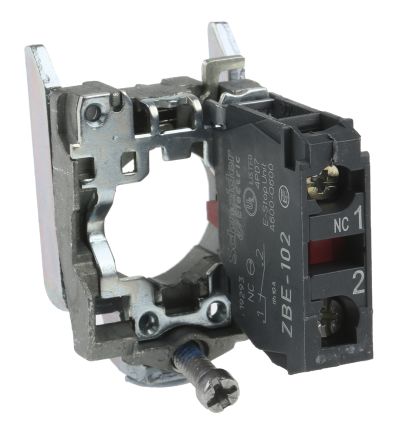
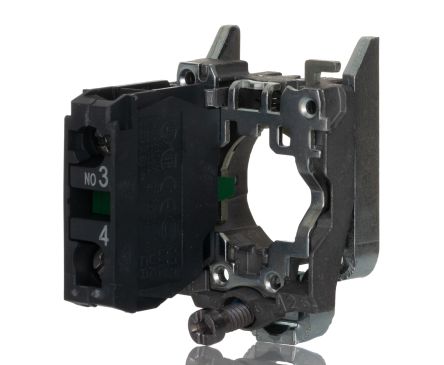
Este é um componente modular. Para uma montagem completa, você também pode precisar de:
Alternativas compatíveis
Estes produtos são referências cruzadas funcionalmente equivalentes de outros fabricantes.
Referência rápida de instalação
Panel cutout: 22mm. Insert from the front of the panel, secure with mounting nut from behind (tighten to 2-3 Nm).
Contact block: Snap or screw the contact block onto the rear of the button body. Ensure the contact block orientation matches the wiring diagram — NO terminals are usually marked.
Wiring: Use 0.5-2.5mm² stranded wire with ferrules. Tighten screw terminals to 0.8 Nm. Test the button function before energizing the circuit.
Dimensões
Diagrama de fiação
Solução de problemas
Button doesn't respond when pressed
Check the contact block first — it's the most common failure point. Test continuity across the NO or NC terminals with a multimeter. If no click is felt, the return spring in the head may be broken.
Works intermittently
Contact block contacts are pitted or burned. Replace the contact block — don't try to file the contacts. Check if the rated cycle count has been exceeded.
Button feels mushy or doesn't click
The spring return mechanism in the button head is worn. Replace the head. The contact block can usually be reused if it tests OK.

Onde comprar
Faixa de preço
$2.13 — $12.93
em 4 distribuidores
Especificações rápidas
- Actuator Shape
- Round
- Actuator Type
- Flush
- Certifications
- UL, CSA, CE
- Color
- Green
- Contact Configuration
- 1NO (with ZB4-BZ101)
O que os usuários dizem
“For any panel with more than 3 buttons I always go illuminated. Operators can see at a glance which station is active. The extra $8-15 per button pays for itself in reduced mis-presses. Schneider XB4 illuminated are my go-to.”
“Always use illuminated for anything the operator needs to see status on. The LED confirms the circuit is active — especially important in noisy environments where you cant hear a relay click. Non-illuminated only for basic start/stop where a separate indicator exists.”
Saiba mais
Graus de proteção IP explicados
O que IP65, IP66, IP67, IP69K significam para sua aplicação
Guia 22mm vs. 30mm
Qual tamanho de recorte de painel você precisa?
Blocos de contato: NO vs. NC
Como escolher e conectar blocos de contato
Ferramenta localizador de botões
Encontre o botão certo por tipo, tamanho e cor
Fontes de dados
Especificações e dados de produto obtidos das seguintes referências.
