ZB4-BW333
現行品Harmony XB4 Illuminated Green Push Button 24V LED

Illuminated green flush push button with integrated 24V LED for Schneider Harmony XB4 series. 22mm cutout, IP66 rated. Provides visual confirmation of active state.
主な用途
Illuminated green push button that lights up when the controlled equipment is running — the LED confirms at a glance that the motor, pump, or compressor is active. Found on commercial kitchen panels where the green glow tells the operator the fryer or oven has reached temperature, and on HVAC control panels indicating the fan or compressor is energized. The integrated 24V LED connects directly to PLC outputs or contactor auxiliary contacts. Pairs with the red illuminated ZB4-BW343 for a matched start/stop set with visual feedback. The IP66 metal bezel handles steam cleaning and humid environments without corrosion.
仕様一覧
|
Actuator Shape
The physical shape of the pressable surface.
|
Round
|
|
Actuator Type
The button head style. Flush sits level with the bezel (prevents accidental presses). Extended protrudes for easy access.
|
Flush
|
|
Certifications
Third-party safety certifications. UL = required for US NEC installations. CE = EU compliance. CSA = Canadian standards.
|
UL, CSA, CE
|
|
Color
Button/actuator color. Green = start/go, Red = stop/emergency, Yellow = caution, Blue = reset (per IEC 60204-1).
|
Green
|
|
Contact Configuration
Normally Open — circuit is off until you press. Standard for start/go/enable functions.
|
1NO (with ZB4-BZ101)
|
|
Cutout Diameter
The hole size you drill in your panel to mount this button. 22mm is the most common industrial standard worldwide.
|
22mm
|
|
Illuminated
|
Yes
|
|
IP Rating
IP66: Dust-tight and withstands powerful water jets from any direction. Standard for outdoor and washdown applications.
|
IP66
|
|
LED Color
Color of the built-in LED indicator light.
|
Green
|
|
LED Voltage
The voltage required for the built-in LED. Must match your control circuit voltage (typically 24V DC or 230V AC).
|
24V AC/DC
|
|
Material
The bezel/body material. Metal bezels are more durable in harsh environments. Plastic is lighter and cheaper.
|
Metal
|
|
Mechanical Life
How many press cycles before mechanical failure. Higher is better — 10M cycles at 100 presses/day = 274 years.
|
10,000,000 cycles
|
|
Mounting Type
How the button attaches to the panel. Panel mount is standard — installs through a cutout from the front.
|
Panel
|
|
Max Operating Temp
Highest temperature the button is rated to operate in.
|
70°C
|
|
Min Operating Temp
Lowest temperature the button is rated to operate in.
|
-25°C
|
このアイコン付きの仕様は、メーカーの元ソースページにリンクしています
併せて必要な部品
これはモジュール部品です。完全な組立には、以下も必要になる場合があります:
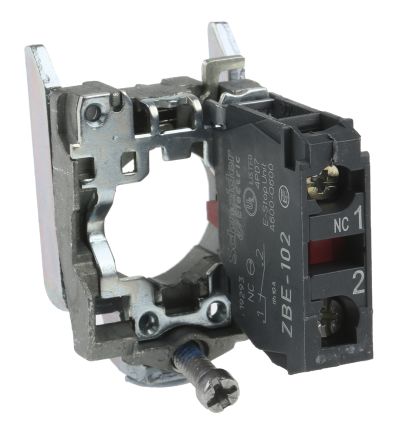
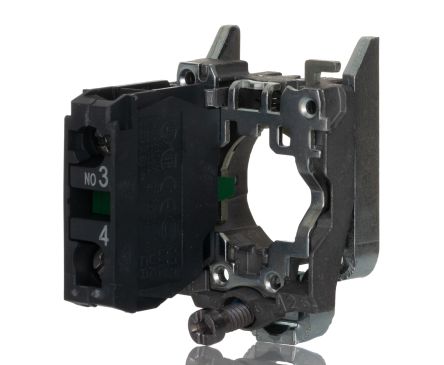
取付クイックリファレンス
Panel cutout: 22mm. Insert from the front of the panel, secure with mounting nut from behind (tighten to 2-3 Nm).
Contact block: Snap or screw the contact block onto the rear of the button body. Ensure the contact block orientation matches the wiring diagram — NO terminals are usually marked.
Wiring: Use 0.5-2.5mm² stranded wire with ferrules. Tighten screw terminals to 0.8 Nm. Test the button function before energizing the circuit.
外形寸法
配線図
トラブルシューティング
Button doesn't respond when pressed
Check the contact block first — it's the most common failure point. Test continuity across the NO or NC terminals with a multimeter. If no click is felt, the return spring in the head may be broken.
Works intermittently
Contact block contacts are pitted or burned. Replace the contact block — don't try to file the contacts. Check if the rated cycle count has been exceeded.
Button feels mushy or doesn't click
The spring return mechanism in the button head is worn. Replace the head. The contact block can usually be reused if it tests OK.

購入先
価格帯
$2.13 — $12.93
4 社の販売代理店
主要仕様
- Actuator Shape
- Round
- Actuator Type
- Flush
- Certifications
- UL, CSA, CE
- Color
- Green
- Contact Configuration
- 1NO (with ZB4-BZ101)
ユーザーの声
“For any panel with more than 3 buttons I always go illuminated. Operators can see at a glance which station is active. The extra $8-15 per button pays for itself in reduced mis-presses. Schneider XB4 illuminated are my go-to.”
“Always use illuminated for anything the operator needs to see status on. The LED confirms the circuit is active — especially important in noisy environments where you cant hear a relay click. Non-illuminated only for basic start/stop where a separate indicator exists.”
詳しく見る
データソース
仕様および製品データは以下の参考資料に基づいています。
