ZB4-BA6
AktywnyHarmony XB4 Blue Flush Push Button Head

Blue flush push button head for Schneider Harmony XB4 series. 22mm cutout, IP66 rated. Used for reset and auxiliary functions.
Typowe Zastosowania
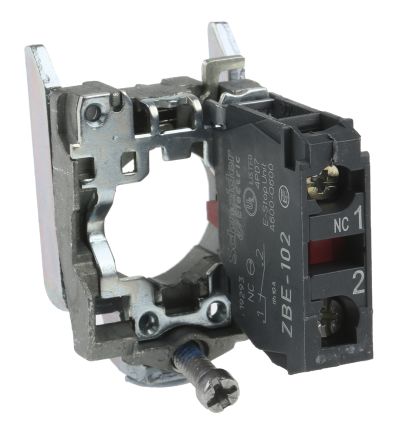
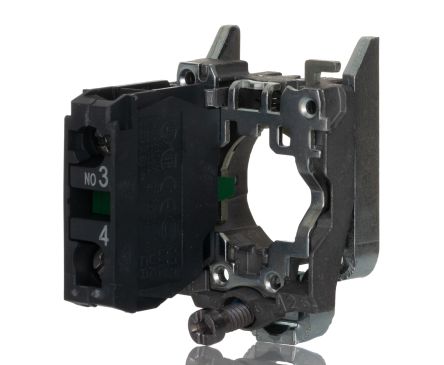
Blue push button head used for non-safety auxiliary functions per IEC 60204-1 — blue indicates a mandatory action or special function. Common on CNC machines for coolant on/off, food processing lines for rinse cycle activation, and HVAC panels for damper control. In many European panel designs, blue signals a function that is neither start (green) nor stop (red) but requires operator attention. Requires a separate contact block — snap on a ZB4-BZ101 (1NO) or ZB4-BZ102 (1NC) depending on the application. The metal bezel matches the premium XB4 family aesthetic.
Specyfikacje
|
Actuator Shape
The physical shape of the pressable surface.
|
Round
|
|
Actuator Type
The button head style. Flush sits level with the bezel (prevents accidental presses). Extended protrudes for easy access.
|
Flush
|
|
Certifications
Third-party safety certifications. UL = required for US NEC installations. CE = EU compliance. CSA = Canadian standards.
|
UL, CSA, CE
|
|
Color
Button/actuator color. Green = start/go, Red = stop/emergency, Yellow = caution, Blue = reset (per IEC 60204-1).
|
Blue
|
|
Contact Configuration
The electrical switching arrangement.
|
Requires separate contact block
|
|
Cutout Diameter
The hole size you drill in your panel to mount this button. 22mm is the most common industrial standard worldwide.
|
22mm
|
|
IP Rating
IP66: Dust-tight and withstands powerful water jets from any direction. Standard for outdoor and washdown applications.
|
IP66
|
|
Material
The bezel/body material. Metal bezels are more durable in harsh environments. Plastic is lighter and cheaper.
|
Metal
|
|
Mechanical Life
How many press cycles before mechanical failure. Higher is better — 10M cycles at 100 presses/day = 274 years.
|
10,000,000 cycles
|
|
Mounting Type
How the button attaches to the panel. Panel mount is standard — installs through a cutout from the front.
|
Panel
|
|
Max Operating Temp
Highest temperature the button is rated to operate in.
|
70°C
|
|
Min Operating Temp
Lowest temperature the button is rated to operate in.
|
-25°C
|
Specyfikacje z tą ikoną są powiązane z oryginalną stroną źródłową producenta
Będziesz Potrzebować Również
To jest komponent modułowy. Do kompletnego zestawu mogą być potrzebne również:
Skrócona Instrukcja Montażu
Panel cutout: 22mm. Insert from the front of the panel, secure with mounting nut from behind (tighten to 2-3 Nm).
Contact block: Snap or screw the contact block onto the rear of the button body. Ensure the contact block orientation matches the wiring diagram — NO terminals are usually marked.
Wiring: Use 0.5-2.5mm² stranded wire with ferrules. Tighten screw terminals to 0.8 Nm. Test the button function before energizing the circuit.
Wymiary
Schemat Połączeń
Rozwiązywanie Problemów
Button doesn't respond when pressed
Check the contact block first — it's the most common failure point. Test continuity across the NO or NC terminals with a multimeter. If no click is felt, the return spring in the head may be broken.
Works intermittently
Contact block contacts are pitted or burned. Replace the contact block — don't try to file the contacts. Check if the rated cycle count has been exceeded.
Button feels mushy or doesn't click
The spring return mechanism in the button head is worn. Replace the head. The contact block can usually be reused if it tests OK.
Gdzie Kupić
Przedział cenowy
$2.27 — $9.92
u 4 dystrybutorów
Skrócone Specyfikacje
- Actuator Shape
- Round
- Actuator Type
- Flush
- Certifications
- UL, CSA, CE
- Color
- Blue
- Contact Configuration
- Requires separate contact block
Co Mówią Użytkownicy
“Solid button for panel builds. Schneider Electric Harmony XB4 series is well-proven in the field. Standard 22mm mounting means easy replacement if needed.”
Dowiedz się Więcej
Objaśnienie Klasyfikacji IP
Co oznaczają IP65, IP66, IP67, IP69K dla Państwa zastosowania
Przewodnik 22mm vs 30mm
Jakiego rozmiaru otworu montażowego potrzebujesz?
Bloki Styków: NO vs NC
Jak wybrać i podłączyć bloki styków
Narzędzie Wyszukiwania Przycisków
Znajdź właściwy przycisk wg typu, rozmiaru i koloru
Źródła Danych
Specyfikacje i dane produktowe pochodzą z poniższych źródeł.
