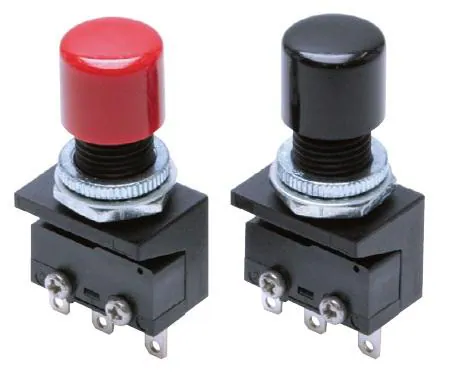
Zdjęcie serii: sprzedawca używa go również dla 2 innych części, więc może nie pokazywać dokładnie tej wersji.
Basic / Snap Action Switches Lighted Pushbutton
Notatki Badawcze
1. What this is
A2A-4R is an Omron A2A pushbutton.
2. Part-number decode
- Series: Omron A2A
- Type: pushbutton
3. Compatibility & ordering
Omron makes industrial command switches (A22 22mm, A16 16mm — unitized, contact in the model code), illuminated pushbuttons/pilot lights (A3, M2), and a widely-used B3 PCB tactile-switch family. Match by size, function (pushbutton/selector/indicator/E-stop), colour, illumination, and contact arrangement, then use the Omron datasheet to confirm the exact colour and voltage encoded in the part number.
4. Data-quality note
The exact Omron product line/configuration could not be confidently decoded from this part number. Kept and documented; flagged needs-verification.
5. Sources
- Omron product catalog (omron.com / components.omron.com)
- Distributor listing (DigiKey / Mouser) — search the exact part number
Verified distributor data (Mouser)
- Official distributor description: Basic / Snap Action Switches Lighted Pushbutton
- Datasheet: https://www.mouser.com/datasheet/3/39/1/a2a_ds_e_2_3_csm614.pdf
- Price (from): 18.84 EUR
- Availability: Check Mouser for availability
This part is carried by Mouser Electronics; the description and datasheet above come straight from the distributor's catalog, confirming and expanding the part-number decode above.
Źródło
- Omron — A2A-4R — omron.com
Specyfikacje
|
Datasheet url
|
https://www.mouser.com/datasheet/3/39/1/a2a_ds_e_2_3_csm614.pdf
|
|
Device class
|
pushbutton
|
|
Enriched by
|
omron-decoder-2026-08-12
|
|
Lead time
|
41 Days
|
|
Manufacturer series
|
A2A
|
|
Mouser checked
|
2026-09-28
|
|
Mouser description
|
Basic / Snap Action Switches Lighted Pushbutton
|
|
Mouser matched
|
true
|
|
Mouser part number
|
653-A2A-4R
|
|
Pn status
|
verified
|
|
Rohs status
|
RoHS Compliant
|
|
Series description
|
Omron A2A-series pushbutton / command switch
|
Skrócona Instrukcja Montażu
Panel cutout: 22mm. Insert from the front of the panel, secure with mounting nut from behind (tighten to 2-3 Nm).
Contact block: Snap or screw the contact block onto the rear of the button body. Ensure the contact block orientation matches the wiring diagram — NO terminals are usually marked.
Wiring: Use 0.5-2.5mm² stranded wire with ferrules. Tighten screw terminals to 0.8 Nm. Test the button function before energizing the circuit.
Wymiary
Rozwiązywanie Problemów
Button doesn't respond when pressed
Check the contact block first — it's the most common failure point. Test continuity across the NO or NC terminals with a multimeter. If no click is felt, the return spring in the head may be broken.
Works intermittently
Contact block contacts are pitted or burned. Replace the contact block — don't try to file the contacts. Check if the rated cycle count has been exceeded.
Button feels mushy or doesn't click
The spring return mechanism in the button head is worn. Replace the head. The contact block can usually be reused if it tests OK.
Gdzie Kupić
Skrócone Specyfikacje
- Datasheet url
- https://www.mouser.com/datasheet/3/39/1/a2a_ds_e_2_3_csm614.pdf
- Device class
- pushbutton
- Enriched by
- omron-decoder-2026-08-12
- Lead time
- 41 Days
- Manufacturer series
- A2A
Dowiedz się Więcej
Objaśnienie Klasyfikacji IP
Co oznaczają IP65, IP66, IP67, IP69K dla Państwa zastosowania
Przewodnik 22mm vs 30mm
Jakiego rozmiaru otworu montażowego potrzebujesz?
Bloki Styków: NO vs NC
Jak wybrać i podłączyć bloki styków
Narzędzie Wyszukiwania Przycisków
Znajdź właściwy przycisk wg typu, rozmiaru i koloru


