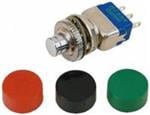
Tactile Switches Asm. Cap / Extender Switch
Specifiche
|
Device class
|
tactile switch
|
|
Enriched by
|
apem-decoder-2026-08-12
|
|
Lead time
|
77 Days
|
|
Manufacturer series
|
tactile
|
|
Mouser part number
|
642-4FSH901
|
|
Pn status
|
decoded
|
|
Rohs status
|
RoHS Compliant
|
|
Series description
|
APEM tactile switch (ADTS / MJTP / #GTH/#FTH/#ETH series — PCB tact switch, through-hole or SMT, various heights and forces)
|
Guida Rapida all'Installazione
Panel cutout: 22mm. Insert from the front of the panel, secure with mounting nut from behind (tighten to 2-3 Nm).
Contact block: Snap or screw the contact block onto the rear of the button body. Ensure the contact block orientation matches the wiring diagram — NO terminals are usually marked.
Wiring: Use 0.5-2.5mm² stranded wire with ferrules. Tighten screw terminals to 0.8 Nm. Test the button function before energizing the circuit.
Dimensioni
Risoluzione dei Problemi
Button doesn't respond when pressed
Check the contact block first — it's the most common failure point. Test continuity across the NO or NC terminals with a multimeter. If no click is felt, the return spring in the head may be broken.
Works intermittently
Contact block contacts are pitted or burned. Replace the contact block — don't try to file the contacts. Check if the rated cycle count has been exceeded.
Button feels mushy or doesn't click
The spring return mechanism in the button head is worn. Replace the head. The contact block can usually be reused if it tests OK.
Dove Acquistare
Fascia di prezzo
$5.35 — $5.35
presso 1 distributori
Specifiche Rapide
- Device class
- tactile switch
- Enriched by
- apem-decoder-2026-08-12
- Lead time
- 77 Days
- Manufacturer series
- tactile
- Mouser part number
- 642-4FSH901
Approfondisci
Classificazioni IP Spiegate
Cosa significano IP65, IP66, IP67, IP69K per la Sua applicazione
Guida 22mm vs 30mm
Quale dimensione del foro pannello Le serve?
Blocchi Contatti: NO vs NC
Come scegliere e cablare i blocchi contatti
Strumento Trova Pulsante
Trovi il pulsante giusto per tipo, dimensione e colore