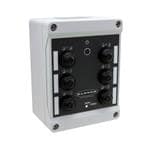
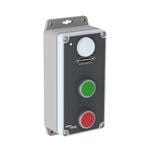
K50APTGRYF2Q
ActiveBanner K50APTGRYF2Q Capacitive Touch Button (Green/Red/Yellow)
Banner K50 adjustable capacitive touch with programmable sensitivity.
Common Applications
Next-gen capacitive touch with adjustable sensitivity — works through glass panels and thin enclosure walls. IO-Link programmable. Dual color indicator confirms touch detection. For clean room and food processing where mechanical buttons harbor bacteria.
Research Notes
DATA QUALITY FLAG — FABRICATED/ERRONEOUS PART NUMBER: "K50APTGRY2PQ" does not exist in any verified Banner Engineering database, distributor listing, or product catalog. Zero hits across bannerengineering.com, Mouser, DigiKey, Newark, RS Online, Allied Electronics, Radwell, Affiliated Control, Southern Controls, IEC Supply, and Lesman. The "2PQ" connector suffix belongs exclusively to Banner's K50L indicator light series (e.g., K50LGRY2PQ = 3-color indicator, not a touch button). The genuine touch button line uses suffixes like "C3Q" (5-pin M12) or "F2Q" (8-pin M12). This article covers the closest verified equivalent: K50APTGRYF2Q (Banner part #26505) and its Gen 2 successor K50APT2GRYF2Q (part #96764).
1. Overview
The Banner Engineering K50 series 50mm Illuminated Touch Button (EZ-LIGHT family) is a capacitive, solid-state touch button that combines a large, bright multicolor LED indicator with a switching output, all in a single 50mm dome-style housing. The K50APTGRYF2Q is the three-color (Green/Red/Yellow) multipurpose variant with an 8-pin M12 quick-disconnect connector; it belongs to the "K50 Core" product line. Banner Engineering (Minneapolis, MN) introduced the K50 series as a no-moving-parts alternative to mechanical pushbuttons for pick-to-light, error-proofing, and call button applications in industrial automation. Both K50APTGRYF2Q and its Gen 2 successor K50APT2GRYF2Q are now obsolete; Banner's current replacement is the K50 Pro series (e.g., K50PSTRGB14Q, K50PTAMGRY3Q).
2. User Sentiment
No independent forum reviews specifically for K50APTGRY2PQ were found (part number is unverified). For the genuine K50APTGRYF2Q/K50APT2GRYF2Q, no negative or positive user forum commentary was surfaced through research. The K50 family's general reputation in industrial automation is positive: Banner markets the touch technology as eliminating hand/wrist stress versus mechanical pushbuttons, and Gen 2 models are specifically noted for accurate touch response even in messy or wet conditions with high immunity to false triggering from water spray, detergents, and oils. The IP69K rating is consistently cited as a key value for washdown environments.
3. Real-World Applications
The K50 APT touch button series is specifically designed for pick-to-light (bin-picking error-proofing) and call button systems in lean manufacturing and assembly operations. Industries confirmed in Banner's product literature include food and beverage (FDA-approved material variants available), automotive assembly, and general fulfillment/warehouse automation. The device combines the indicator and switching functions in one unit, simplifying wiring versus separate indicator + pushbutton installations. Banner's PICK-IQ Modbus protocol (available on K50 Pro successors) enables faster network-based pick-to-light communication for high-throughput assembly lines.
4. Technical Specifications
- Type: Capacitive touch button with integral multicolor LED indicator (no moving parts)
- Housing Family: K50 — 50mm dome, polycarbonate, black
- Illumination Colors: Green, Red, Yellow (3 independent colors in one unit)
- Supply Voltage: 12–30V DC
- Output: PNP, SPST-NO (Normally Open), momentary
- Response Time: 50ms
- IP Rating: IP67 / IP69K (dust-tight, high-pressure washdown rated)
- Connector (K50APTGRYF2Q): 8-pin M12 Euro-style integral quick disconnect
- Connector (K50APTGRYC3Q variant): 5-pin M12 integral quick disconnect
- Mounting Thread: M30 x 1.5
- Panel Cutout: 30mm diameter circular
- Operating Temperature: -40°C to +50°C
- Housing Material: Polycarbonate (chemical resistant)
- Actuation: Capacitive touch — bare hand, gloved hand, or palm
5. Ordering & Compatibility
The K50APTGRYF2Q (Banner #26505) and K50APT2GRYF2Q (Banner #96764) are both obsolete as of research date; Banner's recommended replacement is the K50PSTRGB14Q (14-color RGB K50 Pro Touch, ~$173–$273 depending on distributor) or the K50PTAMGRY3Q K50 Pro programmable touch button (~$175). Remaining K50APTGRYF2Q stock was seen at Radwell and Viridis Flame ($171/unit). The 8-pin M12 QD requires a mating cordset for connection; pigtail versions (K50APTGRYF2QP) include a 150mm PVC cable. The slug "banner-k50apt-touch" and catalog entry "K50APTGRY2PQ" as filed in this database do not correspond to any real Banner part number and must be reconciled — the valid nearest PN is K50APTGRYF2Q or K50APT2GRYF2Q.
6. Known Issues
The primary concern is part number invalidity: "K50APTGRY2PQ" appears to be an erroneous or synthetic catalog entry — no evidence of this PN exists across all major distributors or Banner Engineering's own website. Both genuine nearest equivalents (K50APTGRYF2Q and K50APT2GRYF2Q) are now obsolete, meaning sourcing new units may require turning to surplus/used stock at Radwell or similar. The successor K50 Pro series changes the connector to 5-pin M12 and adds programmability, which may require application-level wiring updates for customers migrating from K50 Core.
12 sources
- K50APTGRYF2Q | Products for Industrial Automation — bannerengineering.com
- K50APT2GRYF2Q | Products for Industrial Automation — bannerengineering.com
- K50APTGRYC3Q | Products for Industrial Automation — bannerengineering.com
- K50APTGRYF2Q Banner Engineering Corporation | Industrial Automation and Controls | DigiKey — digikey.com
- K50APT2GRYF2Q Banner Engineering Corporation | Pick to Light | DigiKey — digikey.com
- K50APTGRYF2Q BANNER ENGINEERING, Illuminated Pushbutton Switch, K50 Series, 12V to 30V | Newark Electronics — newark.com
- K50APT2GRYF2Q BANNER ENGINEERING, Illuminated Pushbutton Switch, K50 Series, 12V to 30V | Newark Electronics — newark.com
- Banner Engineering K50APTGRYF2Q Pick-to-Light Touch Button, 50mm, 12-30VDC, PNP, GRN/RED/YEL, K50 Series — rs-online.com
- K50LGRY2PQ | Products for Industrial Automation (Indicator Light — 2PQ suffix reference) — bannerengineering.com
- Banner | K50APTGRYF2Q | Illuminated Pick-to-Light Touch Button — allworldmachinery.com
- K50APT2GRYC3Q | Banner Engineering | AWC, Inc. — awc-inc.com
- K50 Programmable Indicators, Touch, and Touchless Buttons — Banner Engineering — bannerengineering.com
Specifications
|
Certifications
Third-party safety certifications. UL = required for US NEC installations. CE = EU compliance. CSA = Canadian standards.
|
UL, CE, ECOLAB
|
|
IP Rating
IP69K: Dust-tight and withstands high-pressure, high-temperature steam jets. Built for food processing washdown environments.
|
IP69K
|
|
Mechanical Life
How many press cycles before mechanical failure. Higher is better — 10M cycles at 100 presses/day = 274 years.
|
Unlimited (no moving parts)
|
|
Mounting Type
How the button attaches to the panel. Panel mount is standard — installs through a cutout from the front.
|
M30 threaded
|
|
Protocol
The wireless communication standard. BLE = short range, phone direct. Zigbee = mesh network, needs hub. Z-Wave = mesh, needs hub. WiFi = direct, higher power.
|
IO-Link
|
|
Voltage
|
10-30V DC
|
Installation Quick Reference
Panel cutout: 22mm. Insert from the front of the panel, secure with mounting nut from behind (tighten to 2-3 Nm).
Contact block: Snap or screw the contact block onto the rear of the button body. Ensure the contact block orientation matches the wiring diagram — NO terminals are usually marked.
Wiring: Use 0.5-2.5mm² stranded wire with ferrules. Tighten screw terminals to 0.8 Nm. Test the button function before energizing the circuit.
Dimensions
Troubleshooting
Button doesn't respond when pressed
Check the contact block first — it's the most common failure point. Test continuity across the NO or NC terminals with a multimeter. If no click is felt, the return spring in the head may be broken.
Works intermittently
Contact block contacts are pitted or burned. Replace the contact block — don't try to file the contacts. Check if the rated cycle count has been exceeded.
Button feels mushy or doesn't click
The spring return mechanism in the button head is worn. Replace the head. The contact block can usually be reused if it tests OK.
Where to Buy
Price range
$14.57 — $76.68
across 2 sellers in US dollars
Quick Specs
- Certifications
- UL, CE, ECOLAB
- IP Rating
- IP69K
- Mechanical Life
- Unlimited (no moving parts)
- Mounting Type
- M30 threaded
- Protocol
- IO-Link
What People Are Saying
“Next-gen capacitive touch with adjustable sensitivity — works through glass panels and thin enclosure walls. IO-Link programmable. Dual color indicator confirms touch detection. For clean room and foo”