MP1-01R
在产Modular Red Flush Push Button (1NC)
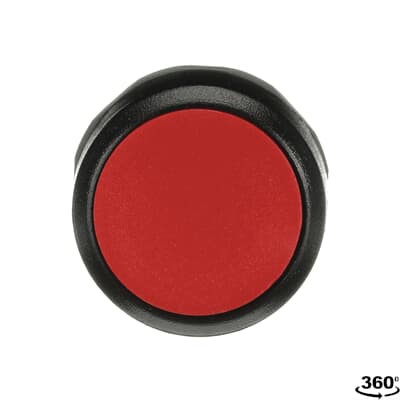
Red flush momentary push button, ABB Modular series. 22mm cutout, IP65, with integrated 1NC contact.
常见应用
Standard stop button in ABB control panel installations. The 1NC contact breaks the circuit when pressed. Common in ABB-centric installations: power distribution substations, variable frequency drive control panels, and process automation in pulp/paper mills. If you are replacing a button on an ABB panel, this is likely the stop button paired with an MP1-10G (green start). The screw terminal accepts 0.5-2.5mm² wire without ferrules.
规格参数
|
Actuator Shape
The physical shape of the pressable surface.
|
Round
|
|
Actuator Type
The button head style. Flush sits level with the bezel (prevents accidental presses). Extended protrudes for easy access.
|
Flush
|
|
Certifications
Third-party safety certifications. UL = required for US NEC installations. CE = EU compliance. CSA = Canadian standards.
|
UL, CSA, CE
|
|
Color
Button/actuator color. Green = start/go, Red = stop/emergency, Yellow = caution, Blue = reset (per IEC 60204-1).
|
Red
|
|
Contact Configuration
Normally Closed — circuit is on until you press. Standard for stop/emergency functions. Wire in series with safety circuits.
|
1NC
|
|
Cutout Diameter
The hole size you drill in your panel to mount this button. 22mm is the most common industrial standard worldwide.
|
22mm
|
|
IP Rating
IP65: Dust-tight and protected against low-pressure water jets. Suitable for indoor industrial and light washdown.
|
IP65
|
|
Material
The bezel/body material. Metal bezels are more durable in harsh environments. Plastic is lighter and cheaper.
|
Plastic
|
|
Mounting Type
How the button attaches to the panel. Panel mount is standard — installs through a cutout from the front.
|
Panel
|
|
Max Operating Temp
Highest temperature the button is rated to operate in.
|
70°C
|
|
Min Operating Temp
Lowest temperature the button is rated to operate in.
|
-25°C
|
带有此图标的规格参数链接到制造商的原始来源页面

兼容替代品
这些产品是来自其他制造商的功能等效互换产品。
安装快速参考
Panel cutout: 22mm. Insert from the front of the panel, secure with mounting nut from behind (tighten to 2-3 Nm).
Contact block: Snap or screw the contact block onto the rear of the button body. Ensure the contact block orientation matches the wiring diagram — NO terminals are usually marked.
Wiring: Use 0.5-2.5mm² stranded wire with ferrules. Tighten screw terminals to 0.8 Nm. Test the button function before energizing the circuit.
尺寸
接线图
故障排除
Button doesn't respond when pressed
Check the contact block first — it's the most common failure point. Test continuity across the NO or NC terminals with a multimeter. If no click is felt, the return spring in the head may be broken.
Works intermittently
Contact block contacts are pitted or burned. Replace the contact block — don't try to file the contacts. Check if the rated cycle count has been exceeded.
Button feels mushy or doesn't click
The spring return mechanism in the button head is worn. Replace the head. The contact block can usually be reused if it tests OK.

购买渠道
价格范围
$2.26 — $4.97
来自 3 家经销商
快速规格
- Actuator Shape
- Round
- Actuator Type
- Flush
- Certifications
- UL, CSA, CE
- Color
- Red
- Contact Configuration
- 1NC
用户评价
“Solid button for panel builds. ABB Modular (MP) series is well-proven in the field. Standard 22mm mounting means easy replacement if needed.”
了解更多
数据来源
规格参数和产品数据来源于以下参考资料。