XB7NA23
Hoạt độngSchneider Electric XB7NA23
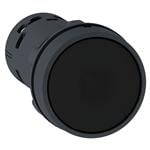
Pushbutton Switches PB - Spring Rtn black - 2NO
Research Notes
1. What this is
XB7NA23 is a Schneider Electric Harmony XB7 economy complete 22mm pushbutton (monolithic, integral contact).
2. Part-number decode
- Series: Harmony XB7
- Panel cutout: 22mm
- Bezel material: Plastic
- Type: complete unit
3. Compatibility & ordering
Schneider's Harmony (22/16mm) and Square D Class 9001 (30mm) are the reference IEC/US command-switch ranges. This is a complete, pre-assembled device (operator + contact block). Match by size (16/22/30mm), bezel material (metal XB4/ZB4 vs plastic XB5/ZB5), function (pushbutton/selector/indicator/E-stop), colour, illumination, and contact arrangement; cross-reference to Allen-Bradley 800F/800T, Siemens 3SU, IDEC HW, or Eaton M22 by the same attributes if needed.
4. Data-quality note
The Schneider series/family is identified; bezel/size are indicative and the exact colour/contact configuration is left to the Schneider datasheet rather than guessed. Flagged decoded-partial.
5. Sources
- Schneider Electric Harmony / Square D Class 9001 catalog (se.com)
- Distributor listing (Rexel / Mouser / Newark) — search the exact part number
1 source
- Schneider Electric — XB7NA23 — se.com
Thông số kỹ thuật
|
Bezel material
|
plastic
|
|
Component type
|
complete unit
|
|
Enriched by
|
schneider-decoder-2026-08-12
|
|
Lead time
|
0 Days
|
|
Manufacturer series
|
Harmony XB7
|
|
Mouser part number
|
996-XB7NA23
|
|
Panel cutout
|
22mm
|
|
Pn status
|
decoded-partial
|
|
Wireless Range
Maximum wireless range in open air. Walls and interference reduce this significantly.
|
Harmony / Square D Class 9001
|
|
Rohs status
|
RoHS Compliant
|
|
Series description
|
Schneider Harmony XB7 economy complete 22mm pushbutton (monolithic, integral contact)
|
Hướng Dẫn Cài Đặt Nhanh
Panel cutout: 22mm. Insert from the front of the panel, secure with mounting nut from behind (tighten to 2-3 Nm).
Contact block: Snap or screw the contact block onto the rear of the button body. Ensure the contact block orientation matches the wiring diagram — NO terminals are usually marked.
Wiring: Use 0.5-2.5mm² stranded wire with ferrules. Tighten screw terminals to 0.8 Nm. Test the button function before energizing the circuit.
Kích thước
Khắc phục sự cố
Button doesn't respond when pressed
Check the contact block first — it's the most common failure point. Test continuity across the NO or NC terminals with a multimeter. If no click is felt, the return spring in the head may be broken.
Works intermittently
Contact block contacts are pitted or burned. Replace the contact block — don't try to file the contacts. Check if the rated cycle count has been exceeded.
Button feels mushy or doesn't click
The spring return mechanism in the button head is worn. Replace the head. The contact block can usually be reused if it tests OK.
Thông số kỹ thuật nhanh
- Bezel material
- plastic
- Component type
- complete unit
- Enriched by
- schneider-decoder-2026-08-12
- Lead time
- 0 Days
- Manufacturer series
- Harmony XB7
