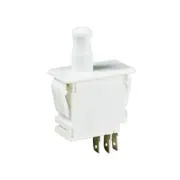
Seri resmi: satıcı bunu 7 başka parça için de kullanıyor, bu nedenle bu tam sürümü göstermeyebilir.
Pushbutton Switches DPDT 10A 125/250 Vac PullOut Button Q.C.
Araştırma Notları
1. What this is
DS2D6CQ3 is a C&K DS-series switch.
2. Part-number decode
- Product line: C&K DS
- Type: switch
3. Compatibility & ordering
C&K makes high-reliability electronic switches for PCB and panel mounting. Match by type (tactile / pushbutton / toggle / rotary), actuation (momentary vs latching), mounting (SMT / thru-hole / panel), and the electrical rating, then use the C&K datasheet to confirm the exact actuator height, force, and termination encoded in the part number.
4. Data-quality note
The exact C&K product line/configuration could not be confidently decoded from this part number (it may be a partial/free-text code fragment). Kept and documented; flagged needs-verification rather than guessed.
5. Sources
- C&K Switches series datasheet (ckswitches.com)
- Distributor listing (DigiKey / Mouser) — search the exact part number
Kaynak
- C&K Switches — DS2D6CQ3 — ckswitches.com
Teknik Özellikler
|
Device class
|
switch
|
|
Enriched by
|
ck-decoder-2026-08-12
|
|
Lead time
|
91 Days
|
|
Manufacturer series
|
DS
|
|
Mouser part number
|
611-DS2D6CQ3
|
|
Pn status
|
needs-verification
|
|
Rohs status
|
RoHS Compliant
|
|
Series description
|
C&K DS-series switch
|
Hızlı Montaj Kılavuzu
Panel cutout: 22mm. Insert from the front of the panel, secure with mounting nut from behind (tighten to 2-3 Nm).
Contact block: Snap or screw the contact block onto the rear of the button body. Ensure the contact block orientation matches the wiring diagram — NO terminals are usually marked.
Wiring: Use 0.5-2.5mm² stranded wire with ferrules. Tighten screw terminals to 0.8 Nm. Test the button function before energizing the circuit.
Boyutlar
Sorun Giderme
Button doesn't respond when pressed
Check the contact block first — it's the most common failure point. Test continuity across the NO or NC terminals with a multimeter. If no click is felt, the return spring in the head may be broken.
Works intermittently
Contact block contacts are pitted or burned. Replace the contact block — don't try to file the contacts. Check if the rated cycle count has been exceeded.
Button feels mushy or doesn't click
The spring return mechanism in the button head is worn. Replace the head. The contact block can usually be reused if it tests OK.
Nereden Satın Alınır
Kısa Teknik Özellikler
- Device class
- switch
- Enriched by
- ck-decoder-2026-08-12
- Lead time
- 91 Days
- Manufacturer series
- DS
- Mouser part number
- 611-DS2D6CQ3

