3SU1130-0AB70-1BA0
ใช้งานอยู่SIRIUS ACT Black Flush Push Button (1NO)

Black flush momentary push button, Siemens SIRIUS ACT series. 22mm cutout, IP66/IP67/IP69K, metal housing, with 1NO contact.
การใช้งานทั่วไป
Black push button from the SIRIUS ACT range used for general-purpose and auxiliary functions. Black indicates no specific safety meaning per IEC 60204-1 — used for reset, test, acknowledge, or any function that doesn't map to the standard color codes. Common on Siemens-controlled automotive assembly lines for cycle start confirmation, test mode activation, and HMI page-change buttons mounted on operator stations. The IP66/IP67/IP69K rating with metal construction handles the most demanding washdown and clean-room environments. Pairs with any 3SU1 series contact block.
Research Notes
1. Overview
The Siemens 3SU1130-0AB70-1BA0 is a complete illuminated flat (flush) pushbutton from the SIRIUS ACT 3SU1 series, featuring a 22mm round plastic body with metal front ring, black actuator color, momentary (spring-return) operation, and a 1NO (normally open) contact configuration. It belongs to the 3SU1130 sub-family, which is Siemens' plastic-body flat-actuator complete-unit line within the broader SIRIUS ACT portfolio — introduced around 2013 to replace the older 3SB series. SIRIUS ACT is Siemens' flagship industrial command and signaling family, competing directly with Schneider Electric's Harmony XB4/XB5 line and Eaton M22 series.
2. User Sentiment
No independent user reviews or forum discussions specific to this exact part number were located. However, the broader SIRIUS ACT 3SU1 series is consistently described by Siemens and distributors as "quick and easy to install" thanks to its snap-on single-handed installation concept, a differentiating feature for panel builders. The modular plug-in architecture is praised for field reconfiguration flexibility without special tools. No documented quality complaints were found in public channels. The series is an active product with wide distributor availability across North America, Europe, and Asia.
3. Real-World Applications
The SIRIUS ACT 3SU1130 plastic flat pushbutton is used predominantly in general-purpose industrial control panels across manufacturing, machine tools, conveyor systems, and material handling equipment. The IP66/IP67/IP69K protection rating makes it suitable for food and beverage processing (washdown environments), automotive assembly lines (cycle start, test mode, HMI page changes), and process control stations. Black actuator color per IEC 60204-1 signifies no specific safety function — used for reset, test, acknowledge, or any general control function. ATEX-certified variants support deployment in gas and dust hazardous areas (Zone 1/2 for gas; Zone 21/22 for dust).
4. Technical Specifications
- Type: Illuminated flat pushbutton, complete unit (actuator + holder + 1NO contact block + LED module)
- Actuator Color: Black (code 0AB70 in SIRIUS ACT numbering)
- Actuator Shape: Round, flat (flush)
- Body Material: Plastic with metal front ring
- Panel Cutout: 22mm (22.3mm locating hole)
- Contact Configuration: 1NO (normally open), momentary (spring-return)
- LED Supply Voltage: 24V AC/DC (integrated LED module)
- Switching Voltage: Up to 500V AC/DC
- Switching Current: Up to 10A
- IP Rating: IP66 / IP67 / IP69K
- NEMA Rating: 1, 2, 3, 3R, 4, 4X, 12, 13
- Operating Temperature: -25°C to +70°C
- Mechanical Life: 3,000,000 operating cycles
- Electrical Life: 10,000,000 operating cycles
- Terminal Type: Screw terminals (0.5–2.5mm² wire, 0.8 Nm torque)
- Certifications: UL, CSA, CE, ATEX, IECEx
- ATEX Classification: II 2G Ex ib IIC T4 Gb (gas); II 2D Ex tb IIIC T120°C Db (dust)
5. Ordering & Compatibility
The 3SU1130-0AB70-1BA0 is a complete unit; pricing based on similar 3SU1130-series and 3SU1102 plastic variants runs approximately $15–$60 USD depending on distributor and volume — with the metal-body comparable 3SU1152-0AB70-1BA0 listed at ~$119.50 at DigiKey (suggesting the plastic variant is lower cost). Availability is typically on manufacturer lead time (4 weeks) at major distributors including Siemens Industry Mall, Mouser, DigiKey, and RS Components. Compatible accessories include 3SU1400 series contact blocks (1NO: 3SU1400-1AA10-1BA0; 1NC: 3SU1400-1AA10-1CA0) and 3SU1401 LED modules. Up to six contact modules can be stacked on the holder. Related part numbers in same color (black/0AB70): 3SU1102-0AB70-1BA0 (plastic, actuator only or different config), 3SU1152-0AB70-1BA0 (metal body equivalent), 3SU1156-0AB70-1BA0 (metal body with spring-loaded terminals).
6. Known Issues
No significant issues reported for this specific part number in publicly available sources. The 3SU1 series broadly requires separate LED modules for illumination in some configurations — users ordering purely the actuator component without specifying a complete-unit suffix may receive a non-illuminated version; verifying the full part number suffix (1BA0 = complete unit with 1NO) is recommended. Lead times of 4 weeks at major distributors suggest this is a configure-to-order item rather than shelf stock, which can be a consideration for maintenance/repair situations.
21 sources
- 3SU1130-0AB70-1BA0 — SIRIUS ACT Black Flush Push Button (1NO) | The Button Index — thebuttonindex.com
- 3SU1 SIRIUS ACT - push buttons, switches, indicators - Siemens Global — siemens.com
- 3SU1 SIRIUS ACT - push buttons switches indicators | Siemens US — siemens.com
- 3SU11520AB701BA0 Siemens | Switches | DigiKey — digikey.com
- 3SU11020AB701BA0 Siemens | Switches | DigiKey — digikey.com
- SIRIUS ACT 3SU1 Series Pushbutton - Siemens | DigiKey — digikey.com
- Siemens 3SU1102-0AB70-1BA0 Drucktaster beleuchtet 22mm rund Kunststoff klar 1S AC/DC 24V | Rexel Germany — rexel.de
- SIRIUS ACT: Powerful Push Buttons, Indicator Lights & Switches — goies.com
- SIRIUS ACT - Contact Module 3SU1 - Siemens Modules — inosaki.com
- SIRIUS ACT - Mushroom Pushbuttons 3SU1 - Siemens Pushbuttons And Indicator Lights — inosaki.com
- 3SU1051-0AB70-0AA0 Pushbutton by SIEMENS | TME — tme.eu
- 3SU1103-0AB70-1BA0 | Siemens SIRIUS ACT 3SU11 Series Illuminated Push Button, 22mm Cutout, SPST | RS Norway — rs-online.com
- 3SU1103-0AB70-1BA0 | Siemens SIRIUS ACT 3SU11 Drucktaster beleuchtet | RS Germany — rs-online.com
- Siemens 3SU1130-0AB10-3FA0, PUSHBUTTON. BLACK — motorsandcontrol.com
- Siemens 3SU1130-0AB20-1CA0, PUSHBUTTON, MOM, RED, FLUSH — motorsandcontrol.com
- 3SU1130-0AB40-1BA0 - SiePortal - Siemens — sieportal.siemens.com
- SIRIUS ACT pushbuttons and indicator lights - Industry Mall - Siemens WW — mall.industry.siemens.com
- SIEMENS SIRIUS ACT 3SU1 SYSTEM MANUAL | ManualsLib — manualslib.com
- Siemens 3SU1400-1AA10-1BA0 Contact Block, SPST-NO, Screw Terminal, Front Plate Mounting, 3SU1 Series | RS USA — rs-online.com
- CONTACT BLOCK, 1NO, FOR FRONT MOUNTING - Siemens 3SU1400-1AA10-1BA0 — empirewc.com
- SIEMENS 3SU1400-1AA10-1BA0 Contact Module 1NO | Amazon — amazon.com
ข้อมูลจำเพาะ
|
Actuator Shape
The physical shape of the pressable surface.
|
Round
|
|
Actuator Type
The button head style. Flush sits level with the bezel (prevents accidental presses). Extended protrudes for easy access.
|
Flush
|
|
Certifications
Third-party safety certifications. UL = required for US NEC installations. CE = EU compliance. CSA = Canadian standards.
|
UL, CSA, CE, ATEX, IECEx
|
|
Color
Button/actuator color. Green = start/go, Red = stop/emergency, Yellow = caution, Blue = reset (per IEC 60204-1).
|
Black
|
|
Contact Configuration
Normally Open — circuit is off until you press. Standard for start/go/enable functions.
|
1NO
|
|
Cutout Diameter
The hole size you drill in your panel to mount this button. 22mm is the most common industrial standard worldwide.
|
22mm
|
|
IP Rating
IP69K: Dust-tight and withstands high-pressure, high-temperature steam jets. Built for food processing washdown environments.
|
IP66/IP67/IP69K
|
|
Material
The bezel/body material. Metal bezels are more durable in harsh environments. Plastic is lighter and cheaper.
|
Metal
|
|
Mounting Type
How the button attaches to the panel. Panel mount is standard — installs through a cutout from the front.
|
Panel
|
|
Max Operating Temp
Highest temperature the button is rated to operate in.
|
70°C
|
|
Min Operating Temp
Lowest temperature the button is rated to operate in.
|
-25°C
|
รายการสเปคที่มีไอคอนนี้เชื่อมโยงไปยังหน้าต้นฉบับของผู้ผลิต
คุณยังต้องการ
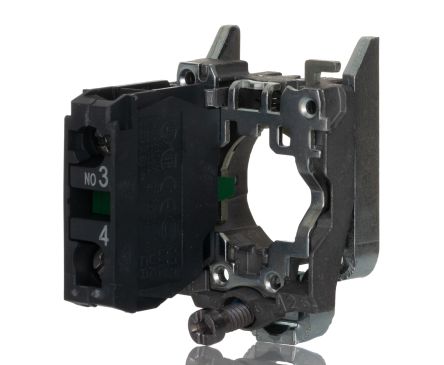
นี่เป็นส่วนประกอบแบบโมดูลาร์ สำหรับการประกอบที่สมบูรณ์ คุณอาจต้องการ:
คู่มือการติดตั้งอย่างรวดเร็ว
Panel cutout: 22mm. Insert from the front of the panel, secure with mounting nut from behind (tighten to 2-3 Nm).
Contact block: Snap or screw the contact block onto the rear of the button body. Ensure the contact block orientation matches the wiring diagram — NO terminals are usually marked.
Wiring: Use 0.5-2.5mm² stranded wire with ferrules. Tighten screw terminals to 0.8 Nm. Test the button function before energizing the circuit.
ขนาด
แผนภาพการเดินสายไฟฟ้า
การแก้ไขปัญหา
Button doesn't respond when pressed
Check the contact block first — it's the most common failure point. Test continuity across the NO or NC terminals with a multimeter. If no click is felt, the return spring in the head may be broken.
Works intermittently
Contact block contacts are pitted or burned. Replace the contact block — don't try to file the contacts. Check if the rated cycle count has been exceeded.
Button feels mushy or doesn't click
The spring return mechanism in the button head is worn. Replace the head. The contact block can usually be reused if it tests OK.

สถานที่จำหน่าย
ช่วงราคา
$2.42 — $6.24
จาก 3 ผู้จัดจำหน่าย
ข้อมูลจำเพาะอย่างย่อ
- Actuator Shape
- Round
- Actuator Type
- Flush
- Certifications
- UL, CSA, CE, ATEX, IECEx
- Color
- Black
- Contact Configuration
- 1NO
สิ่งที่ผู้คนพูดถึง
“Solid button for panel builds. Siemens SIRIUS ACT 3SU1 series is well-proven in the field. Standard 22mm mounting means easy replacement if needed.”
เรียนรู้เพิ่มเติม
แหล่งข้อมูล
ข้อมูลจำเพาะและข้อมูลผลิตภัณฑ์อ้างอิงจากแหล่งข้อมูลต่อไปนี้
Siemens 3SU1130-0AB70-1BA0 Product Page
https://sieportal.siemens.com/en-ww/products-services/detail/3SU11300AB701BA0
เข้าถึงเมื่อ March 29, 2026
