XALD211
ActiveHarmony XALD 2-Button Start/Stop Station
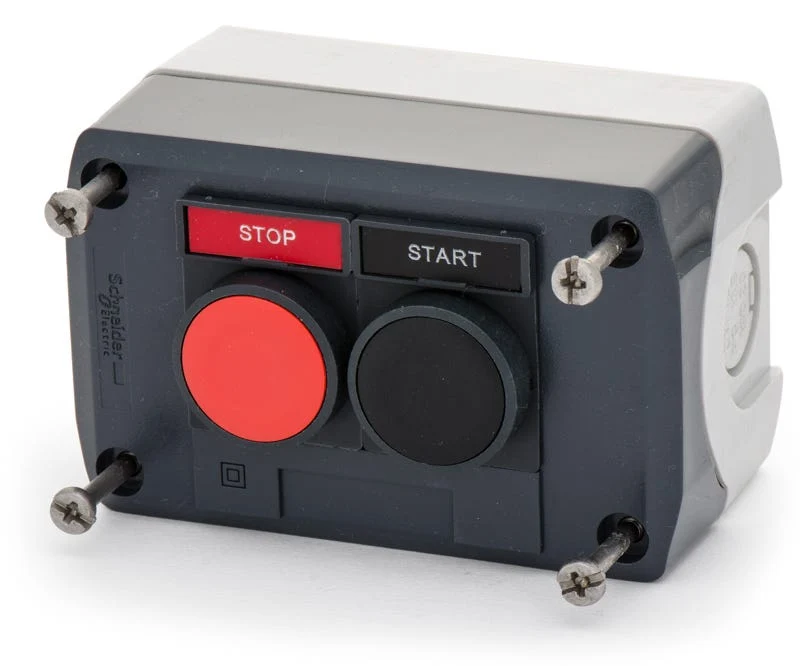
Schneider XALD 2-button station — green start + red stop in one enclosure.
Common Applications
The most common control station in the world. Green start (1NO) and red stop (1NC) in a single IP66 sealed enclosure. Mount on a wall or machine frame. Pre-wired with cable glands. Found on millions of motor starters, pump stations, and conveyor lines globally. One part number = complete start/stop station.
Research Notes
1. Overview
The Schneider Electric XALD211 (full catalog XALD211H29H7) is a pre-assembled 2-button Start/Stop control station from the Harmony XALD enclosed-station line — a dark-grey polycarbonate enclosure fitted with a green flush "I" (start) and a red flush "O" (stop) pushbutton, wired as 1 NO + 1 NC. It's a ready-to-mount, IP66 surface station for basic motor/machine start-stop control (Harmony XB5 22 mm operators). Unlike the empty XALD enclosures (XALD01/03), this is a populated station.
2. User Sentiment
Enclosed Start/Stop stations like this are valued for fast, standard installation — the classic green-start/red-stop pair in one box saves assembling operators and contacts individually, and the dark-grey/green-red presentation is instantly recognizable. Robust Harmony hardware. Considerations: confirm the contact set (1 NO start + 1 NC stop here) matches the control circuit and whether any interlock/latching is needed.
3. Real-World Applications
Basic motor/machine start-stop — press green to start (energize via NO), press red to stop (open via NC). Mounted on machine sides, walls, or frames without a panel cutout.
4. Technical Specifications
- Type: Harmony XALD 2-button Start/Stop control station (enclosed, surface-mount)
- Operators: green "I" (start) + red "O" (stop) flush pushbuttons (XB5 22 mm)
- Contacts: 1 NO + 1 NC (start NO / stop NC)
- Enclosure: dark-grey polycarbonate; IP66
- Approvals: UL, CSA, CE
5. Ordering & Compatibility
Complete populated station (green/red) — no separate operator/contact ordering. For a plain empty enclosure to build your own, use XALD01/XALD02/XALD03 (1/2/3 holes). The full catalog number carries the exact configuration (e.g. XALD211H29H7). Uses standard Harmony XB5 22 mm parts for service.
6. Known Issues
No notable reliability issues — standard Harmony hardware. Practical care: verify the contact configuration suits the control circuit (basic start-stop is 1 NO + 1 NC; add contacts/interlocks for more complex control), and confirm mounting and cable entry.
Compatibility
Uses standard XB4/XB5 buttons and contact blocks internally. Buttons can be individually replaced if needed.
Specifications
|
Certifications
Third-party safety certifications. UL = required for US NEC installations. CE = EU compliance. CSA = Canadian standards.
|
UL, CSA, CE
|
|
Color
Button/actuator color. Green = start/go, Red = stop/emergency, Yellow = caution, Blue = reset (per IEC 60204-1).
|
Green + Red
|
|
Contact Configuration
1NO + 1NC: One circuit closes and one opens when pressed. Common for start buttons that also signal 'running' state.
|
1NO + 1NC
|
|
Enclosure color
|
Dark grey (green start + red stop buttons)
|
|
Full catalog
|
XALD211H29H7
|
|
IP Rating
IP66: Dust-tight and withstands powerful water jets from any direction. Standard for outdoor and washdown applications.
|
IP66
|
|
Material
The bezel/body material. Metal bezels are more durable in harsh environments. Plastic is lighter and cheaper.
|
Polycarbonate
|
|
Mounting Type
How the button attaches to the panel. Panel mount is standard — installs through a cutout from the front.
|
Surface mount (enclosed)
|
|
Operators
|
Green flush I (start, 1NO) + red flush O (stop, 1NC), XB5
|
|
Series
The manufacturer's product family. Products in the same series share mounting systems and accessories.
|
Harmony XALD populated station (vs empty XALD01/02/03)
|
Installation Quick Reference
Panel cutout: 22mm. Insert from the front of the panel, secure with mounting nut from behind (tighten to 2-3 Nm).
Contact block: Snap or screw the contact block onto the rear of the button body. Ensure the contact block orientation matches the wiring diagram — NO terminals are usually marked.
Wiring: Use 0.5-2.5mm² stranded wire with ferrules. Tighten screw terminals to 0.8 Nm. Test the button function before energizing the circuit.
Dimensions
Wiring Diagram
Troubleshooting
Button doesn't respond when pressed
Check the contact block first — it's the most common failure point. Test continuity across the NO or NC terminals with a multimeter. If no click is felt, the return spring in the head may be broken.
Works intermittently
Contact block contacts are pitted or burned. Replace the contact block — don't try to file the contacts. Check if the rated cycle count has been exceeded.
Button feels mushy or doesn't click
The spring return mechanism in the button head is worn. Replace the head. The contact block can usually be reused if it tests OK.
Where to Buy
Price range
$73.92 — $179.53
across 3 sellers in US dollars
Quick Specs
- Certifications
- UL, CSA, CE
- Color
- Green + Red
- Contact Configuration
- 1NO + 1NC
- Enclosure color
- Dark grey (green start + red stop buttons)
- Full catalog
- XALD211H29H7
What People Are Saying
“The most common control station in the world. Green start (1NO) and red stop (1NC) in a single IP66 sealed enclosure. Mount on a wall or machine frame. Pre-wired with cable glands. Found on millions o”
