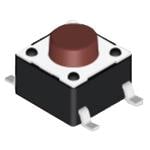
Tactile Switches Surface Mounting Type 6*6
Research Notes
1. What this is
DTSM-68Y-V-T/R is a Diptronics tactile switch.
2. Part-number decode
- Series: Diptronics tactile
- Type: tactile switch
3. Compatibility & ordering
Diptronics makes tactile switches and DIP/configuration switches for PCB use. Match by type, actuation, illumination, sealing, and mounting, then use the manufacturer datasheet to confirm the exact contact and termination encoded in the part number.
4. Data-quality note
The Diptronics series and switch type are decoded from the part number (grounded in the manufacturer catalog and distributor listings). The exact contact arrangement, termination, and cap/colour are encoded in the full order code — confirm against the datasheet for a precise order (not guessed here).
5. Sources
- Diptronics product catalog (diptronics.com)
- Distributor listing (DigiKey / Mouser) — search the exact part number
1 source
- Diptronics — DTSM-68Y-V-T/R — diptronics.com
Especificações
|
Device class
|
tactile switch
|
|
Enriched by
|
diptronics-decoder-2026-08-12
|
|
Lead time
|
117 Days
|
|
Manufacturer series
|
tactile
|
|
Mouser part number
|
113-DTSM68YVTR
|
|
Pn status
|
decoded
|
|
Rohs status
|
RoHS Compliant
|
|
Series description
|
Diptronics tactile switch (DTS/T*/PT*/MPT*/TL/TM/TBF/ML family — PCB tact switch, SMD or through-hole, T/R packaging)
|
Referência rápida de instalação
Panel cutout: 22mm. Insert from the front of the panel, secure with mounting nut from behind (tighten to 2-3 Nm).
Contact block: Snap or screw the contact block onto the rear of the button body. Ensure the contact block orientation matches the wiring diagram — NO terminals are usually marked.
Wiring: Use 0.5-2.5mm² stranded wire with ferrules. Tighten screw terminals to 0.8 Nm. Test the button function before energizing the circuit.
Dimensões
Solução de problemas
Button doesn't respond when pressed
Check the contact block first — it's the most common failure point. Test continuity across the NO or NC terminals with a multimeter. If no click is felt, the return spring in the head may be broken.
Works intermittently
Contact block contacts are pitted or burned. Replace the contact block — don't try to file the contacts. Check if the rated cycle count has been exceeded.
Button feels mushy or doesn't click
The spring return mechanism in the button head is worn. Replace the head. The contact block can usually be reused if it tests OK.
Especificações rápidas
- Device class
- tactile switch
- Enriched by
- diptronics-decoder-2026-08-12
- Lead time
- 117 Days
- Manufacturer series
- tactile
- Mouser part number
- 113-DTSM68YVTR
Saiba mais
Graus de proteção IP explicados
O que IP65, IP66, IP67, IP69K significam para sua aplicação
Guia 22mm vs. 30mm
Qual tamanho de recorte de painel você precisa?
Blocos de contato: NO vs. NC
Como escolher e conectar blocos de contato
Ferramenta localizador de botões
Encontre o botão certo por tipo, tamanho e cor
