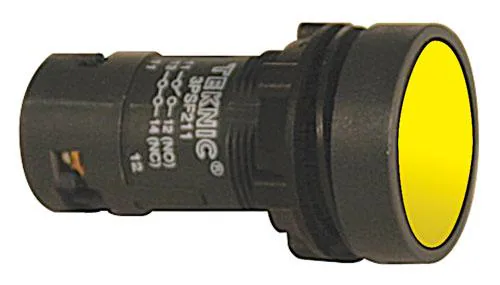
Immagine della serie: il venditore la utilizza anche per 4 altri articoli, quindi potrebbe non mostrare questa versione esatta.
Pushbutton Switches Push Button,Economy 22mm,Main.
Note di Ricerca
1. What this is
3PSPP820 is an Altech component — series not recognized.
2. Part-number decode
- Series: Altech Altech (series not recognized)
3. Compatibility & ordering
Altech 22/30mm pushbuttons are cost-effective IEC-style panel operators. Match by size (22mm), operator material (metal vs plastic), illumination (and voltage), action, and contact blocks; cross-reference to Schneider Harmony, Allen-Bradley 800F, Siemens 3SU, or Eaton M22 by the same attributes if needed.
4. Data-quality note
The exact Altech series/configuration could not be confidently decoded from this part number. Kept and documented; flagged needs-verification rather than guessed.
5. Sources
- Altech Corp datasheet / 22mm pushbutton tech specs (altechcorp.com)
- Distributor listing (Mouser / Future Electronics) — search the exact part number
Verified distributor data (Mouser)
- Official distributor description: Pushbutton Switches - Industrial Push Button,Economy 22mm,Main.
- Price (from): 11.29 EUR
- Availability: Check Mouser for availability
This part is carried by Mouser Electronics; the description and datasheet above come straight from the distributor's catalog, confirming and expanding the part-number decode above.
Fonte
- Altech Corp — 3PSPP820 — altechcorp.com
Specifiche
|
Enriched by
|
altech-decoder-2026-08-12
|
|
Lead time
|
0 Days
|
|
Manufacturer series
|
Altech (series not recognized)
|
|
Mouser checked
|
2026-09-28
|
|
Mouser description
|
Pushbutton Switches - Industrial Push Button,Economy 22mm,Main.
|
|
Mouser matched
|
true
|
|
Mouser part number
|
845-3PSPP820
|
|
Pn status
|
verified
|
|
Series description
|
Altech Corp industrial control component — exact series/config could not be decoded from this part number; kept and flagged for verification rather than guessed
|
Guida Rapida all'Installazione
Panel cutout: 22mm. Insert from the front of the panel, secure with mounting nut from behind (tighten to 2-3 Nm).
Contact block: Snap or screw the contact block onto the rear of the button body. Ensure the contact block orientation matches the wiring diagram — NO terminals are usually marked.
Wiring: Use 0.5-2.5mm² stranded wire with ferrules. Tighten screw terminals to 0.8 Nm. Test the button function before energizing the circuit.
Dimensioni
Risoluzione dei Problemi
Button doesn't respond when pressed
Check the contact block first — it's the most common failure point. Test continuity across the NO or NC terminals with a multimeter. If no click is felt, the return spring in the head may be broken.
Works intermittently
Contact block contacts are pitted or burned. Replace the contact block — don't try to file the contacts. Check if the rated cycle count has been exceeded.
Button feels mushy or doesn't click
The spring return mechanism in the button head is worn. Replace the head. The contact block can usually be reused if it tests OK.
Dove Acquistare
Specifiche Rapide
- Enriched by
- altech-decoder-2026-08-12
- Lead time
- 0 Days
- Manufacturer series
- Altech (series not recognized)
- Mouser checked
- 2026-09-28
- Mouser description
- Pushbutton Switches - Industrial Push Button,Economy 22mm,Main.
Approfondisci
Classificazioni IP Spiegate
Cosa significano IP65, IP66, IP67, IP69K per la Sua applicazione
Guida 22mm vs 30mm
Quale dimensione del foro pannello Le serve?
Blocchi Contatti: NO vs NC
Come scegliere e cablare i blocchi contatti
Strumento Trova Pulsante
Trovi il pulsante giusto per tipo, dimensione e colore


