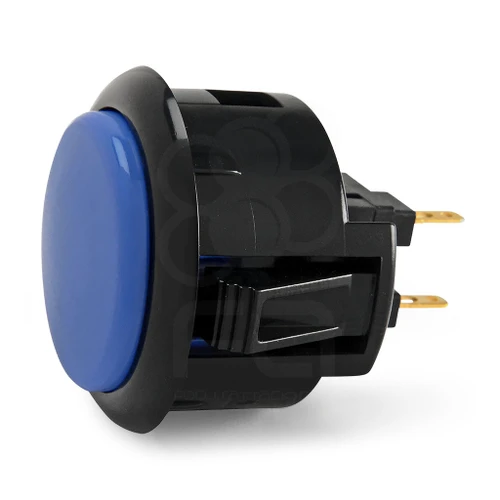
Description 2 Reviews 24 vs 30mm These SANWA OBSF-30 include a black rim. Often these work great for those who prefer a more unified appearance in their custom joystick. As with original Sanwas, these 30mm buttons are compatible with the MadCatz line of FightSticks, Qanba FightSicks, and Hori model. The low-profile snap-in buttons are specifically for custom joysticks that use a metal control panel. Sanwa's 30mm button snap right into most configurations, and offer the best reaction time, smoothest and quietest of any button. The buttons are available in a variety of colors for great customization. You can also buy multiple buttons and swap out the rim with original Sanwas for even more customization. 2 Reviews Hide Reviews Show Reviews WRITE A REVIEW Write a Review Close × Sanwa Denshi Black Rim Sanwa OBSF 30mm Pushbutton Dark Blue / Black Rating Required Select Rating 1 star (worst) 2 stars 3 stars (average) 4 stars 5 stars (best) Name Required Email Required Review Subject Required Comments Required Quality you expect! Good stuff. Unknown on Jul 30th 2023 Works well Didn't change my life, but they're the right colors, they fit, and they work flawlessly. The silencers make the buttons much quieter. Grant on Mar 25th 2016 When processing orders, a frequent mistake we found among new players is choosing the wrong size for action buttons, such as punch and kick. Within the fighting game genre, Japanese arcade buttons commonly consist of two diameter sizes: 24 millimeter and 30 milllimeter (mm). In most configurations, 30mm represents your action button. These are front facing, appearing most prominent on your Fightstick control panel. Option button, such as "Start", "Select", or more recently "Option", "Touch", or "Share" are usually 24mm. UPDATE: Owners of Neo Geo AES Joysticks will need 24mm pushbuttons instead of 30mm (Thanks SRK's DEZALB) Below is a visual representation of a common Fightstick control panel. Throughout this article, we will mark 24mm in green, and 30mm in Orange. Checking the Proper Size Another way that players can misinterpret the pushbutton size is by measuring the pushbutton plunger. Have a look at the diagram at right. The plunger - the part that you press down to represent an input - is 25mm or a bit smaller in most 30mm pushbuttons. Often this leads to the conclusion that one needs a 24mm button and not 30mm. Similarly measuring the button rim can lead to confusion, as it is intentionally larger than the button hole it is placed in. You don't want to use these measurements. Instead, review the button housing diameter, or the hole the button will be placed in. You can do this with a caliper - a digital caliper is often quite helpful for this and other arcade-related projects. Control Panel Configuration Most Fightsticks from MadCatz, Hori, Qanba, and similar will use these two sizes. How the buttons are used will depend on the model joystick that you own. Over time, we'll provide example configurations for specific popular Fightstick models and arcade cabinets using the color key for 24mm (green) and 30mm (orange). We'll also expand the key for future models if another size is introduced, and we offer for sale.
Research Notes
1. What this is
Sanwa Denshi Black Rim Sanwa OBSF 30mm Pushbutton Dark Blue / Black is a Sanwa Denshi arcade pushbutton — Sanwa OBSF (snap-in).
2. Spec decode (from product name)
- Family: Sanwa OBSF (snap-in)
- Diameter: 30mm
3. Compatibility & use
Standard Japanese/US-style arcade pushbutton. Match by diameter (30mm main / 24mm start-aux), mounting (snap-in vs screw-in for panel thickness), shape (convex/concave), and finish; confirm the microswitch tab size for your wiring.
4. Data-quality note
The arcade button's family, size, and mount are decoded from the product name (the standard way arcade parts are specified). Confirm exact colour and microswitch tab size against the vendor listing.
5. Sources
- Sanwa Denshi / arcade-parts vendor listing (Focus Attack, Paradise Arcade, Arcade Shock, arcadexpress.com)
- Slagcoin pushbutton guide (slagcoin.com/joystick/pushbuttons.html)
1 source
- Sanwa Denshi Black Rim Sanwa OBSF 30mm Pushbutton Dark Blue / Black — arcade-parts vendor
Specifications
|
Arcade family
|
Sanwa OBSF (snap-in)
|
|
Device class
|
arcade pushbutton
|
|
Diameter
|
30mm
|
|
Enriched by
|
arcade-decoder-2026-08-12
|
|
Pn status
|
decoded
|
|
Series description
|
Sanwa Denshi arcade pushbutton — Sanwa OBSF (snap-in)
|
Installation Quick Reference
Mounting: Snap-in buttons push into a 30mm hole from the top of the panel. Screw-in buttons thread from below and secure with a nut. Use 2-3mm acrylic, wood, or metal panel.
Wiring: Connect the microswitch terminals to your encoder or PCB. Common ground shared across all buttons. Quick-disconnect (0.110") terminals are standard on Japanese buttons.
Dimensions
Troubleshooting
Not responding to input
Check wiring continuity with a multimeter. Verify the contact block is properly seated. Inspect terminals for loose connections.
Quick Specs
- Arcade family
- Sanwa OBSF (snap-in)
- Device class
- arcade pushbutton
- Diameter
- 30mm
- Enriched by
- arcade-decoder-2026-08-12
- Pn status
- decoded


