AX-1149
ActiveCrown/Samducksa Crown SDB-202M MX Cherry Screw In Korean Arcade Button 24mm
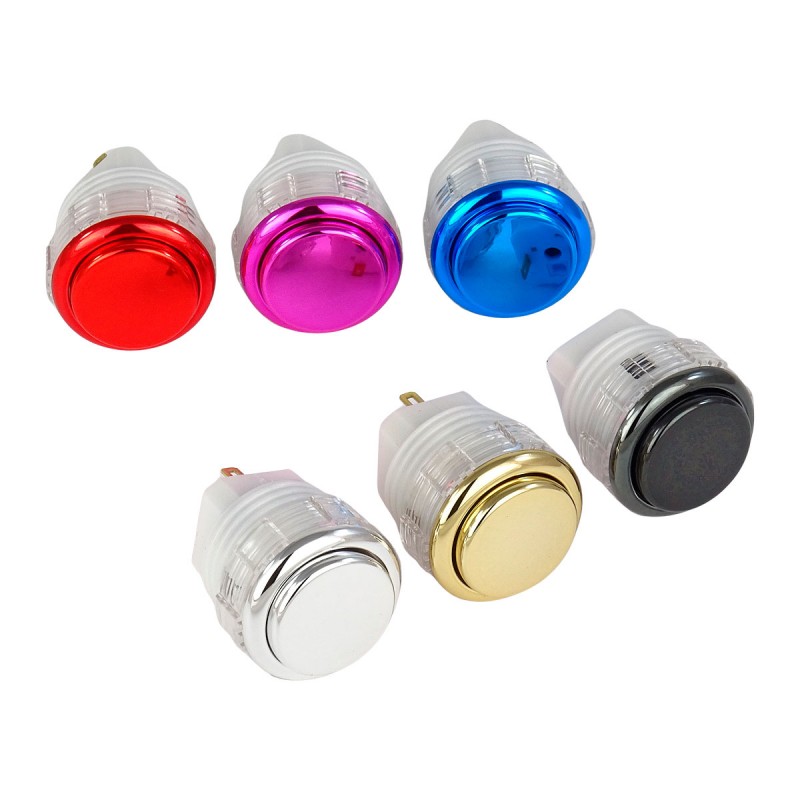
Korean Samducksa Arcade push button model SDB-202M of 24mm with Cherry MX Speed Silver microswitch and metallic color.
Research Notes
1. Overview
The Crown/Samducksa SDB-202M (24 mm) is a 24 mm metallic-finish screw-in arcade pushbutton (Korean-made by Crown/Samducksa) — the start/option/auxiliary-button size. Like the rest of the SDB-202 "Cherry series," it uses a Cherry MX-style keyboard switch inside (e.g. Cherry MX Speed), giving a shorter-travel, tactile/keyboard-like feel and a swappable switch. The metallic (M) version has a metal-look plunger, and it's screw-in for secure mounting. It's the 24 mm sibling of the 30 mm SDB-202M (#536).
2. User Sentiment
Favored by fight-stick/hitbox builders who want a snappier, shorter-travel press than Sanwa for Start/Select and auxiliary buttons, plus the ability to swap the Cherry MX switch to tune feel/force. Metallic finishes are prized aesthetically. The feel is noticeably different from Sanwa/Seimitsu (preference-dependent).
3. Real-World Applications
Start / Select / option and auxiliary (24 mm) buttons on arcade cabinets, fight sticks, and hitbox/leverless controllers — especially premium/metallic builds wanting a keyboard-switch feel and swappable actuation. Pairs with 30 mm main buttons.
4. Technical Specifications
- Type: 24 mm metallic screw-in arcade pushbutton (Crown/Samducksa SDB-202M)
- Switch: Cherry MX-style keyboard switch (swappable; e.g. MX Speed) — shorter travel, tactile/keyboard feel
- Finish: metallic plunger
- Mounting: screw-in (24 mm cutout)
- Sizes: 24 mm (this) and 30 mm (SDB-202M, #536)
5. Ordering & Compatibility
Fits 24 mm panel cutouts (screw-in). Pairs with 30 mm main buttons. The swappable Cherry MX switch lets you change feel/force. Sold by arcade specialists (Paradise Arcade, Focus Attack, etc.). Confirm screw-in vs snap-in, the 24 mm cutout, and the desired metallic finish/switch.
6. Known Issues
No notable reliability issues — the Cherry MX switch is durable and swappable. The main consideration is the feel differs from Sanwa/Seimitsu (shorter, more tactile); confirm mounting, cutout, and switch/finish when ordering.
2 sources
- Samducksa SDB-202M 24mm Metallic Screw-in button (Cherry MX) — paradisearcadeshop.com
- Crown/Samducksa SDB-202M 24mm metallic Cherry MX arcade button — focusattack.com
Specifications
|
Arcade express id
|
1149
|
|
Device type
|
Crown/Samducksa SDB-202M 24mm metallic screw-in arcade button
|
|
Diameter
|
24mm
|
|
Finish
|
Metallic
|
|
Mounting Type
How the button attaches to the panel. Panel mount is standard — installs through a cutout from the front.
|
Screw-in
|
|
Reference pn
|
SDB-202M 24mm (AX-1149 is an Arcade Express catalog ID)
|
|
Switch type
|
Cherry MX-style keyboard switch (swappable; e.g. MX Speed) — shorter travel/tactile
|
|
Weight kg
|
0.010000
|
Installation Quick Reference
Mounting: Snap-in buttons push into a 24mm hole from the top of the panel. Screw-in buttons thread from below and secure with a nut. Use 2-3mm acrylic, wood, or metal panel.
Wiring: Connect the microswitch terminals to your encoder or PCB. Common ground shared across all buttons. Quick-disconnect (0.110") terminals are standard on Japanese buttons.
Dimensions
Troubleshooting
Not responding to input
Check wiring continuity with a multimeter. Verify the contact block is properly seated. Inspect terminals for loose connections.
Quick Specs
- Arcade express id
- 1149
- Device type
- Crown/Samducksa SDB-202M 24mm metallic screw-in arcade button
- Diameter
- 24mm
- Finish
- Metallic
- Mounting Type
- Screw-in