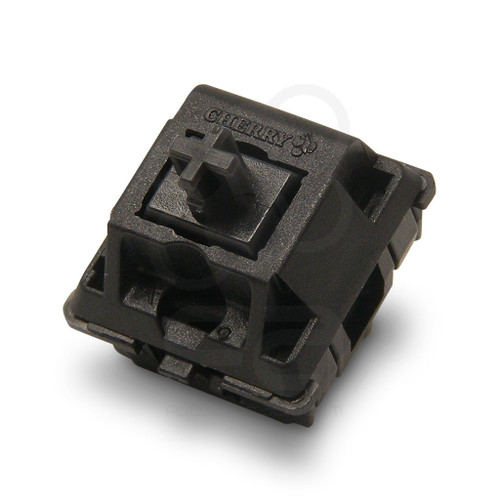
CHERRY-MX-BLUE-SWITCH
ActiveCherry MX Blue Stem 50g Mechanical Switch for Samducksa 202 MX Pushbutton

Description 5 Reviews Videos The Crown/Samducksa family of MX pushbutton offers incredible durability, responsiveness, and a unique feedback system thanks to its use of mechanical key switches. Cherry MX™ Blue Cherry MX™ Blue "click tactile feel" sends a little bump to your fingers, and has an audible click the moment the button command is sent to the console or PC. The feedback can speed up your execution because you do not have to press the button all the way down to activate the button command. The diagram at right shows how the blue MX switch works. You can see that the switch activates at the halfway point -- the moment the white piece snaps down. 60g means that a bit more force is needed to push down. Operating Force, Feel, and Different Key Switches Explained The immediate benefit of incorporating the HBFS pushbutton into your gameplay is the ability to choose your preferred level of operating force, simply by switching out the mechanical key switches. What does linear feel or tactile feel mean? Linear feel means that the feel is consistent from the moment you press down on the button. Tactile feel provides a bit of feedback upon actuation. Operating Force means how hard you have to push the button and how hard it will push back when depressed.The g in 45g, for example, represents a metric unit of force. Swapping Key Switches to Adjust Operating Force and Feedback Because the HBFS uses mechanical key switches, you can purchase other switches that offer a higher operating force, or a different feel. Each are color-coded based on their characteristics: Red: 45g operating force, linear feel Silver: 45g operating force, linear feel, operative travel 1.2mm versus 2mm of Red MX Black: 60g operating force, linear feel Brown: 55g operating force, soft tactile feel Blue: 60g operating force, click tactile feel Razer MX Orange: 45g operating force, soft tactile feel, silent operation, operative travel 1.9mm versus 2mm of Red MX Razer MX Green: 50g operating force, click tactile feel, operative travel 1.9mm versus 2mm of Red MX 10x more durable than Sanwa RG Sanwa's RG microswitches are known to last longer than the standard SW-68 switches. Thanks to the mechanical key switch, HBFS possesses a much longer lifespan through use of mechanical switches - 50 million operations versus 500,000 - for about the same price as as the RG. Change your Gameplay, or Repair/Replace These key switches offer their own unique feedback and press capabilities, potentially improving your approach your fighting game execution. Should you need to replace few damaged switches in a mechanical keyboard (purchases limited to 12pcs), these should do the trick. Make sure to check the type of switch that your keyboard uses before purchasing. Thanks to The Keyboard Company and PC World for helpful descriptions on key switch characteristics. Animated illustrations by cherrymx.de. 5 Reviews Hide Reviews Show Reviews WRITE A REVIEW Write a Review Close × Cherry Cherry MX Blue Stem 50g Mechanical Switch for Samducksa 202 MX Pushbutton Rating Required Select Rating 1 star (worst) 2 stars 3 stars (average) 4 stars 5 stars (best) Name Required Email Required Review Subject Required Comments Required great switches if you want heavy buttons Amazing switch if you dont like those super sensitive switches since the blue one requires the most pressure out of all of them Unknown on Jul 5th 2024 Great micro switch Super great micro switch with tactile clicky feeling. Got them to swap out the silver/grey ones that comes in samducksa screw in buttons, they need a break in period it seems, as the clicky accuation part of the switch is not there at first, it felt linear at first then after spamming the switch some time you get the feeling you want, tactile and clicky. Alexander on Sep 24th 2021 I trust GamerFinger products and parts. I've been purchasing their parts for a while and they have great customer service when I bought the silver switches and they were bent post production. Sent me new ones plus these blue mechanical switches to boot. Highly recommended and the buttons/switches feels great! AngriestAngryArtist on Dec 13th 2019 Great Product and good packaging Packaged arrived earlier and in good condition! Buttons will never be the same again after these switches were installed. Loved the click during button presses. Ken Martin on Dec 11th 2019 Nice switch with loud click I bought this cherry blue, a razer green, a gateron blue and a gateron green, for my gamerfinger set, I tested for a week or so going between them and with 2 gamerfinger button cases, before I committed to an entire set of gamerfinger buttons for my current stick, (which has 11 active buttons and 2 side buttons, custom stick with i-pac pcb) and this switch is what I chose. It was close between it and the gateron blue, but this won out, cause it makes a much nicer sounding click. This and the gaterons feel wonderful to push with a nice satisfying feel, along with a loud click, but the
Specifications
|
Actuation Force
The force needed to press the button. Lower = more sensitive. Sanwa ~65g (light), Seimitsu ~85g (medium), Happ ~130g (heavy).
|
50g
|
|
Device class
|
mechanical keyboard switch
|
|
Enriched by
|
keyboard-decoder-2026-08-12
|
|
Pn status
|
decoded
|
|
Series description
|
Cherry mechanical keyboard switch (clicky)
|
|
Switch type
|
clicky
|
Installation Quick Reference
Mounting: Snap-in buttons push into a 30mm hole from the top of the panel. Screw-in buttons thread from below and secure with a nut. Use 2-3mm acrylic, wood, or metal panel.
Wiring: Connect the microswitch terminals to your encoder or PCB. Common ground shared across all buttons. Quick-disconnect (0.110") terminals are standard on Japanese buttons.
Dimensions
Troubleshooting
Not responding to input
Check wiring continuity with a multimeter. Verify the contact block is properly seated. Inspect terminals for loose connections.
Quick Specs
- Actuation Force
- 50g
- Device class
- mechanical keyboard switch
- Enriched by
- keyboard-decoder-2026-08-12
- Pn status
- decoded
- Series description
- Cherry mechanical keyboard switch (clicky)
Learn More
More from Cherry
Cherry
CHERRY-MX-BLACK-SWITCH
Cherry MX Black Stem 60g Mechanical Switch for Samducksa 202 MX Pushbutton

Cherry
CHERRY-MX-BROWN-SWITCH
Cherry MX Brown Stem 55g Mechanical Switch for Samducksa 202 MX Pushbutton

Cherry
CHERRY-MX-RED-SWITCH
Cherry MX Red Stem 45g Mechanical Switch for Samducksa 202 MX Pushbutton